A digital menu board on the TV you already have
Turn the TV on your wall into a menu board: a menu with prices, scenes on a schedule, video backgrounds, QR codes, guest Wi-Fi and radio. Build the screen in a web editor, open one link on the TV, and it stays in sync from then on. If your venue runs on a Deye inverter, the same screen also shows your solar station live and how long you can keep working through a blackout.
Free plan foreverNo extra hardwareOpen source
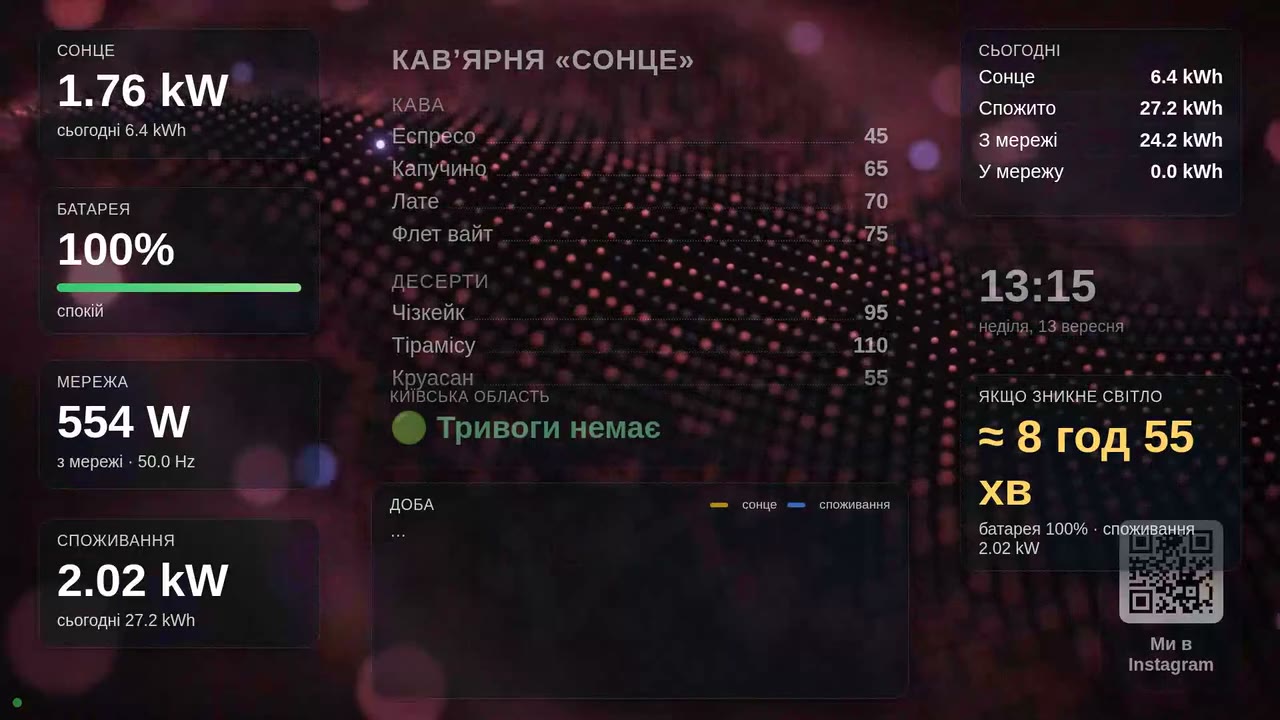
A menu you can update in a minute
Change a price or add a dish in the dashboard and it is on the TV a second later. No USB sticks, no designer, no printing.
Menu with prices
Sections, items and prices from plain text. Nine fonts, adjustable size and colours to match your venue.
Scenes on a schedule
Up to ten layouts per TV: breakfast until noon, lunch deals, an evening menu. They rotate by timer or by time of day.
Backgrounds, QR and radio
30+ looping video backgrounds or your own videos and photos. QR codes for Instagram or guest Wi-Fi, online radio in one click.
How it works
Build the screen in the dashboard
Drag widgets on the canvas, type in your menu, pick a background. Changes appear on the TV instantly.
Open tv.sun-hunter.men/tv on the TV
Enter the six-digit code from the dashboard. The TV remembers the screen from then on, even after a power cut.
Optionally connect your inverter
Three fields on the Solarman Wi-Fi stick settings page, and solar, battery and blackout runtime appear on the screen. The Solarman app keeps working.
What goes on the screen
Your menu
A multi-section menu with prices in a large, readable font, with colours and a card style to suit your interior. Update it in the dashboard and every TV follows.
Scenes and schedule
Several layouts on one TV with a timer and hours of display.
Video backgrounds
Fireplace, waterfall, aquarium, rain on the window: 30+ clips licensed for venues, or your own videos and photos.
QR codes
Guest Wi-Fi in one scan, your menu, Instagram or reviews. Just paste a link or a password.
Online radio
14 Ukrainian stations, switched from the dashboard without touching the TV.
Air-raid alerts
The status of your region in Ukraine on screen and a full-screen banner during an alert. No keys or setup, just pick the region.
Weather and tomorrow's sun
Temperature, wind, sunset, and for solar stations a generation forecast for tomorrow.
Live solar readings
Solar, battery, grid, load and an energy-flow diagram. Updated every 10 seconds.
Charts and eco stats
The day's generation curve on screen, a year of history in the dashboard, monthly solar kWh and CO₂ saved.
When the power goes out
If your venue runs on a Deye hybrid inverter, the screen answers the staff's main question by itself: how long can we keep going?
Grid down: the screen shows it at once
The grid widget turns red: "power is out, running on battery". You can pin a dedicated scene for the duration of an outage.
Hours left
Remaining battery and an estimate such as "about 3 h 20 min at the current load". Below 40% it turns yellow, near the minimum it turns red.
What is safe to switch on
Live consumption: turn on the grill or the boiler and both the number and the estimate change right away. Staff decide what can wait.
Pricing
The code is open, so you can run it on your own server. The paid plan is priced on purpose at no more than renting that server.
Free
- 1 TV and 1 inverter logger
- Every feature: menu, scenes, own videos and photos, radio
- One year of history and charts
- A small SunHunter TV badge and a QR plaque every 10 minutes
Pro
About $15. Six months for 3000 ₴ (one month free), a year for 6000 ₴ (two months free)
- Up to 5 TVs and 5 loggers
- Every feature, same as Free
- No branding on screen
- Priority support
Card payment in the dashboard via monobank
Max
- Chains: up to 50 TVs and loggers
- Other inverter brands
- Custom widgets and branding
- Priority support
What to know before you start
Do I need an inverter or a solar station?
No. The digital menu, scenes, video backgrounds, QR codes, radio, weather and alerts work on any TV with no hardware at all. Solar widgets are an extra for venues with a Deye inverter.
How do I update the menu?
In the dashboard, from a phone or a computer: change the text, a price or a scene, press Save, and a second later the new menu is on the TV. Nothing to carry on a USB stick, nothing to restart.
Which TVs are supported?
Any Smart TV with a browser: Samsung, LG, Android TV, or a TV stick. Open tv.sun-hunter.men/tv on the TV and enter the six-digit code from the dashboard.
Can I show a different menu in the morning and in the evening?
Yes. One TV can have up to ten scenes. Each has its own display time and an optional schedule, for example breakfast from 8:00 to 12:00.
How much does it cost?
The Free plan is free forever with every feature: one TV and one logger, all widgets, your own videos and photos, radio, a year of history. Pro is 600 UAH per month (about $15): the same for 5 TVs and 5 loggers, with no branding on screen.
Which inverters are supported?
Deye hybrid inverters: single-phase SG0xLP1, three-phase low-voltage SG04LP3 and high-voltage SG01HP3. Data is read through the Solarman Wi-Fi stick the inverter already has, and the Solarman app keeps working. Other brands on request in the Max plan.
What do staff see during a blackout?
A red banner "no grid power since 14:20", the remaining battery in percent and an estimate "about 3 h 20 min at the current load". Turn on the grill and the estimate is recalculated at once.
Can I self-host it?
Yes. The code is open source under AGPL-3.0 on GitHub. A VDS with 2 cores and 2 GB of RAM is enough.
Open source
The project is open under AGPL-3.0: server, dashboard, TV screen and firmware for ESP8266/ESP32 with signed updates. The inverter protocol is documented. Repository: deye-dashboard on GitHub.